Lecture 6 - Conditional Statements and the Structure of Python Code
Overview, Objectives, and Key Terms
In this lesson, we turn back to Python and begin the development of more complicated programs. The emphasis here and in Lecture 7 is on the logic of selection and its implementation via conditional statements in Python. Effective use of conditional statements requires a thorough understanding of the relational and logical operators defined in Lesson 2. Of course, one must also first be comfortable with the theoretical coverage of selection presented in Lecture 5.
Objectives
By the end of this lesson, you should be able to
explain the importance of indentation in Python programs
write a program with conditional statements containing
if,else, andelifpredict the outcome of a Python program with
if,else, andelifstatements
Key Terms
ifelseelifsuite
NameErrorternary operation
SyntaxErrorpass
The Simplest if
Recall the basic conditional statement from Lecture 5, repeated graphically here:
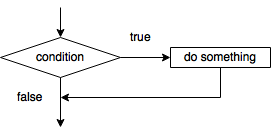
In pseudocode, that same statement could be written as
If the condition is satisfied then
    Do something
Very nearly the same structure is used in Python. Consider as a simple example a program that accepts as input a number and prints a message to the user if that number is negative. In Python, that’s easy:
[ ]:
number = int(input('enter your number '))
if number < 0:
    print("the number is negative")
[ ]:
number = int(input('enter your number '))
if number < 0:
    print("the number is negative")
This example illustrates the basic syntax of if statements, and four key observations can be made:
The
ifstatement begins with the keywordif. Becauseifis a keyword, we can’t use it as a name for variables. Rather,ifcan only be used forifstatements.The condition is
number < 0, which is an expression relatingnumberand0by the<relational operator. In other words,number < 0is eitherTrueorFalse. WhenTrue, the statement immediately following theifstatement is executed. Otherwise, that line (here, the one withprint) is skipped.Immediately after the condition is a
:(i.e., a colon). This colon is required and indicates the end of theifstatement. There is no then in Python.The line immediately after the
ifstatement (the one withprint) is indented. Here, that indentation consists of four spaces. At least one space is required, but four spaces is most common and recommended for all indentation. Moreover, all lines in the same block of code (e.g., the lines optionally executed if the condition of anifstatement is satisfied) must have the same indentation. Such a block of code is called a “suite” in the Python documentation.
To get comfortable with the basic if-statement structure, it is worth exploring a few examples:
Exercise: Suppose a and b are numbers already defined. Use an if statement to swap their values when b is less than a.
Solution:
if b < a:
      tmp = b # tmp is a very common abbreviation for temporary
      b = a
      a = tmp
Exercise: What does the following code do?
a = 1
b = False
c = 'Harry Potter'
d = 0
if a and b or c and not d:
      print("The answer is 42.")
Solution: It prints out “The answer is 42.” To know that, however, requires you can evaluate the condition. Remember that the order of operations is important. First not, then and, and finally or is applied. The result is True (since not 0 equals True).
Exercise: What does this code do?
from math import sqrt # one can import single functions
a, b, c = 1, 2, 3 # what does this statement do?
if b**2 > 4*a*c
      root1 = (-b + sqrt(b**2 > 4*a*c))/(2*a)
     root2 = (-b - sqrt(b**2 > 4*a*c))/(2*a)
print(root1, root2)
Solution: Actually, it doesn’t do anything but lead to errors! First, the Python interpreter catches that the if statement is missing its colon. If that gets fixed, the interpreter then catches that the indentation is not uniform in the block of code immediately following the if. Both root1 and root2 should start in the same column, but root2 starts one column before root1. Finally, for the particular values of a, b, and c, b**2 is less than 4*a*c,
and the condition is not satisfied. Hence, neither root1 nor root2 are defined, and the print statement is therefore using undefined names.
Warning: Variables must be defined (i.e., assigned a value) before they can be used. Otherwise, a
NameErrorwill occur.
The else Clause
The basic if statement provides a way to skip certain lines of code. However, often one wants to choose between two alternative lines of code. Perhaps for our example above, we would like to let the user also know when a number is nonnegative, i.e., a separate print statement should be executed when number >= 0. In Python, we can use the else clause to define an optional block of code to be executed when the condition is not satisfied. For our number example, the updated
program is
[ ]:
number = int(input('enter your number '))
if number < 0:
    print("the number is negative")
else:
    print("the number is nonnegative")
Note, the else clause is not something built explicitly into the flowcharts we have seen, but it is possible to do so by adding a process block (rectangle) between the conditional block (diamond) and subsequent blocks along the arrow labeled “false.”
Exercise: Modify the flowchart for the basic conditional statement to include processes performed when the condition is not satisfied.
As has been mentioned, all if statements (including those with the else clause) can be rewritten in terms of basic if statements. In some cases, the resulting code is more complicated. For our modified number example, we could use two basic if statements to achieve the same behavior as the if/else structure:
[ ]:
number = int(input('enter your number '))
if number < 0:
    print("the number is negative")
if number >= 0:
    print("the number is nonnegative")
This solution is logically equivalent to the if/else version, but it is a bit more complex. First, the total amount of code is a bit larger because we need to explicitly define a second condition. Moreover, because we have to define that condition explicitly, we have increased the chance of introducing a logical error (or “bug”) into our program. For instance, if we accidentally had set the second condition to number > 0, which might seem right at first glance, the result would not
be equivalent because the case in which number == 0 would be missed.
Exercise. Are the following equivalent?
# Option 1
a = 9
if a%2:
      a -= a%2
else:
      a += 1

# Option 2
a = 9
if a%2:
      a -= a%2
if not a%2:
      a += 1
Solution: They might look equivalent, but they are not. In Option 1, a%2 is 1, so a -= a%2 is executed, and with the result that a == 8. The else block is skipped. In Option 2, a%2 is again 1, and so a -= a%2 is executed and a == 8 after the first if. However, now the second condition not a%2 is also satisfied, meaning that a += 1 is executed, and a == 9 at the end. Hence, any time the variables that show up in the condition of an if statement
are modified, future conditions involving those same variables may have different values. We could make Option 2 equivalent to Option 1 by using a temporary variable, e.g., b = a - a%2 and b = a + 1, in each if statement, and then set a = b after both statements. Kind of ugly, no? But possible!
The elif Clause
Consider again the number example explored above. The else clause lets us tell the user that the number is negative or nonnegative. What if insteady we wanted to know whether number is negative, positive, or neither (i.e., zero)? In Python, that can be decided by using the elif clause:
[ ]:
number = int(input('enter your number '))
if number < 0:
    print("the number is negative")
elif number > 0:
    print("the number is positive")
else:
    print("the number is zero")
In English, elif can be translated as “else if”. There is no limit to the number of elif clauses added.
Exercise: Create a flowchart for the
numberexample that shows whether thenumberis positive, negative, or zeros.
Just as can be done for the if/else construct, the if/elif/else construct can be rewritten with basic if statements:
[ ]:
number = int(input('enter your number '))
if number < 0:
    print("the number is negative")
if number > 0:
    print("the number is positive")
if number == 0:
    print("the number is zero")
Of course, there will be certain cases that are much harder to represent with only basic if statements.
Other Tidbits
Ternary Operation
A basic if-then statement can be written as a compact, ternary operation (with three inputs, as opposed to the two required for binary operations like addition), e.g.,
[ ]:
a = 1
b = 2
c = "a" if a > b else "b"
c
This is equivalent to the more traditional if-else construct
[ ]:
a = 1
b = 2
if a > b:
    c = "a"
else:
    c = "b"
c
The ternary operation is presented here for completeness. Its compact form makes it useful in some situations, but for most applications, the more traditional if statement with the else clause is much easier to read.
Note: A regular
ifstatement with theelseclause is preferred to the ternary operation for almost all applications.
The pass Placeholder
Sometimes in writing Python programs, you know that you will need a block of code to be executed as part of an if statement (or, later on, within loops and functions) but you are not yet read to define it. You might try the following:
[ ]:
a = 1
if a == 0:
    # eventually I'll do something here but I have to get to class
  File "<ipython-input-9-bbd7c5da3fed>", line 3
    # eventually I'll do something here but I have to get to class
                                                                  ^
SyntaxError: unexpected EOF while parsing
Whoops! A nasty SyntaxError has popped up, which means we broke the rules of Python. The rule we broke is that every “suite” (block of code) following things like if must have at least one line of code. Comments do not count.
Warning: All blocks of code in
ifand other constructs must contain at least one line of code.
To help in these situations, Python offers the pass statement, which can be used as follows:
[ ]:
a = 1
if a == 0:
    # eventually I'll do something here but I have to get to class
    pass
Further Reading
Nothing for now.